The latest Business Pilot update introduces a series of refinements focused on administrative control and communication transparency. These enhancements centre on providing greater flexibility in user management and deeper visibility into messaging costs. By extending permission structures to more roles and refining the data available within the communication logs, the system provides a more robust framework for managing both internal teams and external interactions.
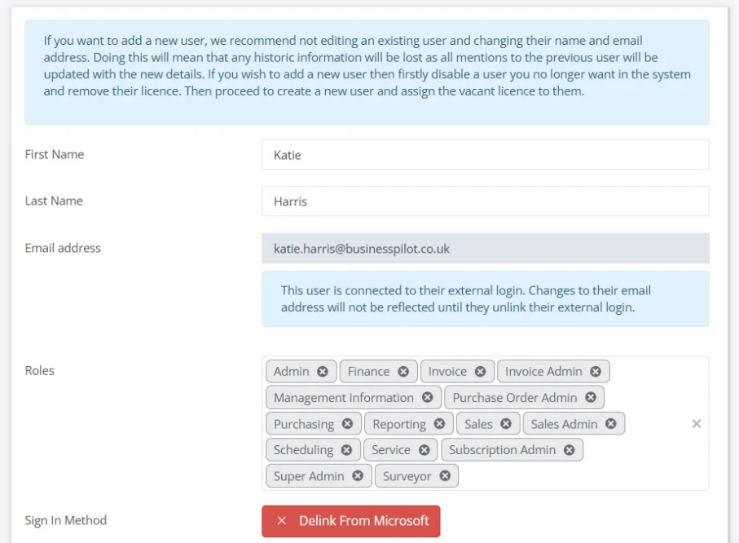
You can now manually delink a Microsoft account from user profiles. Admin users and operators can now view a user’s authentication status and, where necessary, disconnect the external provider to revert the account to a standard password login or change their linked email if necessary.
SMS Segment and Credit Tracking
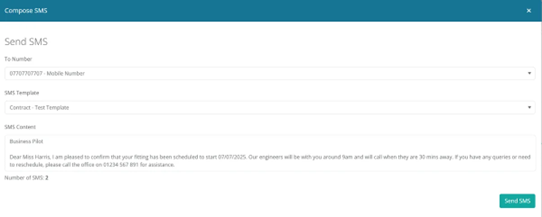
Updates to the SMS system provide greater visibility regarding message lengths and credit usage. When composing a message or creating a template, a real-time count now displays the number of credits required for the send. This allows for more accurate tracking of how long messages are before they are dispatched.
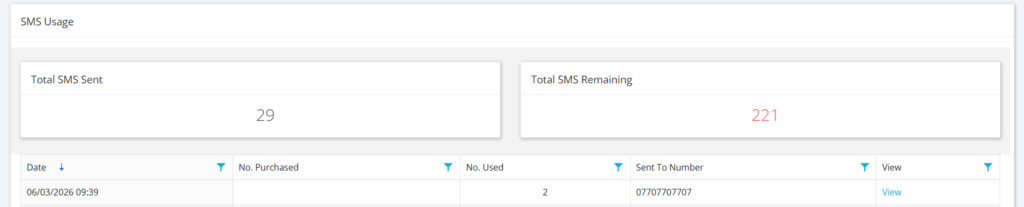
The SMS Usage Log has also been refined to show the specific number of credits consumed per message. While automated appointment reminders require estimation based on the template used, all other SMS areas now provide a clear view of the message volume and associated costs.
External Email
The email functionality has been updated to allow for greater flexibility when communicating with external parties. Users now have the ability to include email addresses that are not currently stored within the system’s contact lists. This ensures that relevant third parties can be kept in the loop on specific correspondence without the requirement of creating a formal contact record first.
Refined Surveyor User Restrictions
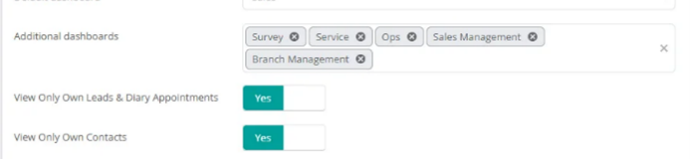
The permissions framework has been updated to ensure greater consistency in how user access is managed across different roles. The option to restrict a user to viewing only their own Leads and Contracts, which was previously available for Sales roles, has been extended to Surveyor roles.
When enabled, this restriction ensures that users can only access records they have personally added or those for which they are the designated Surveyor.
Support Button Visibility
Please note that in line with recent support updates, the support button is now exclusively visible to Admin Users to help streamline the management of technical queries.
We look forward to seeing these enhancements drive immediate efficiency for your team. Alongside these main features, several performance refinements have been deployed to ensure a smooth and reliable experience. We encourage you to explore these new tools today, and as always, our team is available to provide any necessary assistance.