
In our latest system update, we have focused on how you can log and track service calls giving you even greater control and flexibility in this area, improving your financial documentation by adding Purchase Invoice documents to POs, and introducing comprehensive digital marketing campaign tracking via our API.
Here is a complete breakdown of what has been added to the platform:
Multiple Reasons for Service Calls
From recent user feedback we appreciate the single bulk text description had become a limitation and we have been keen to address this for everyone. Therefore, you can now log multiple reasons for a single service/remedial call, operating much like the ‘Product Interests’ feature on a Lead, with an ‘Add Additional Reason for Call’ button option.
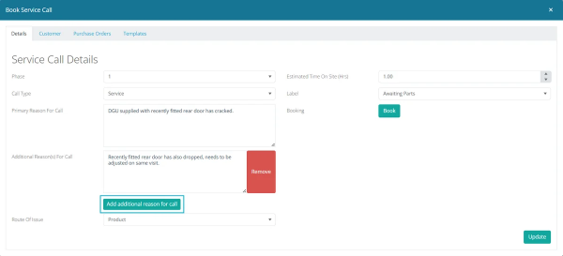
These reasons will display as clean, individual lines on the standard service call sheet and remain fully editable and can also be easily removed at any stage.
To support your automated communications stay in line with these updates, we have introduced new placeholders for both your service call reasons and service call labels. You can find these in the document template help area, ready to be dropped into your printed document and email templates.
Service Call Custom Labels
We have introduced custom labels to the Service Call section, mirroring the popular functionality already available for Enquiries. You can now build custom statuses and flags to manage customer service records exactly how your business operates. To ensure full visibility, these new labels can be viewed directly on your main dashboard by enabling the new column option.
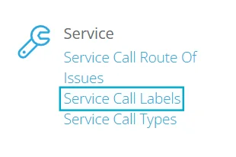
Select ‘Service’ and then ‘Service Call Labels’ in the admin administration menu
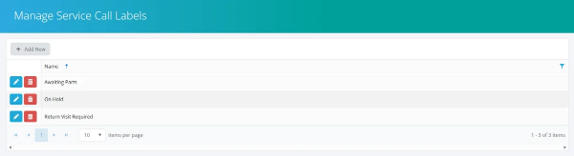
Add each label that you use within your service calls.
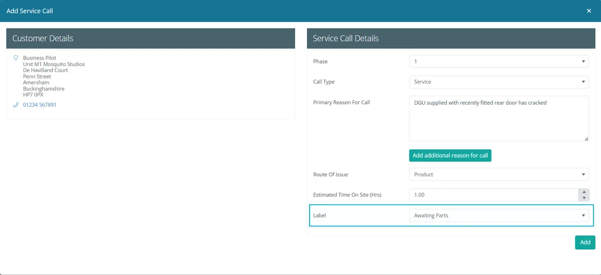
You can then select a relevant label within the service call.
This is how it is seen on the Service Calls grid.

Mobile App Update: Service Call Visibility
To ensure the new service call features are just as useful for your field team as they are for your office staff, we have updated the mobile app to display this new information directly within the job bookings.
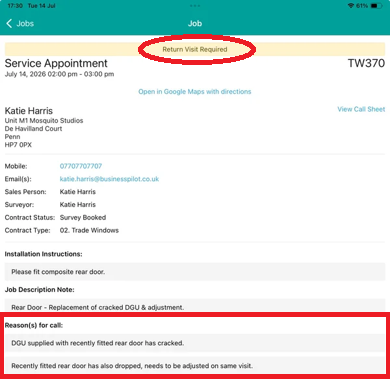
Service Call Labels: Any custom labels or statuses applied in the main system will now be prominently displayed at the very top of the service call booking in the app. This gives your engineers immediate visibility of the job status before they even look at the full details.
Comprehensive Call Reasons: If multiple reasons have been logged for a specific service call, your field team will now see the complete picture. Previously, all call information was grouped together into one single box. Now, the app splits each reason into its own separate box, displaying each individual issue clearly underneath the primary reason for the call. This ensures your fitters arrive on site fully prepared for all the work required.
Linking Purchase Orders to Service Calls
Managing replacement parts for remedial work just got significantly easier. Previously, tracking whether parts had been ordered for a specific service call meant clicking into individual contracts to check the purchase order status, which was time consuming for the team. To streamline this process, we have introduced a direct link between Purchase Orders and Service Calls.
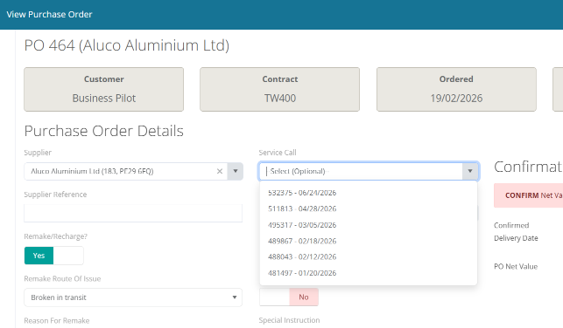
Direct Linking: When adding a Purchase Order to a contract, you will now see an option to reference it directly against a specific active service call. This ensures your parts are explicitly tied to the exact remedial job they are needed for.
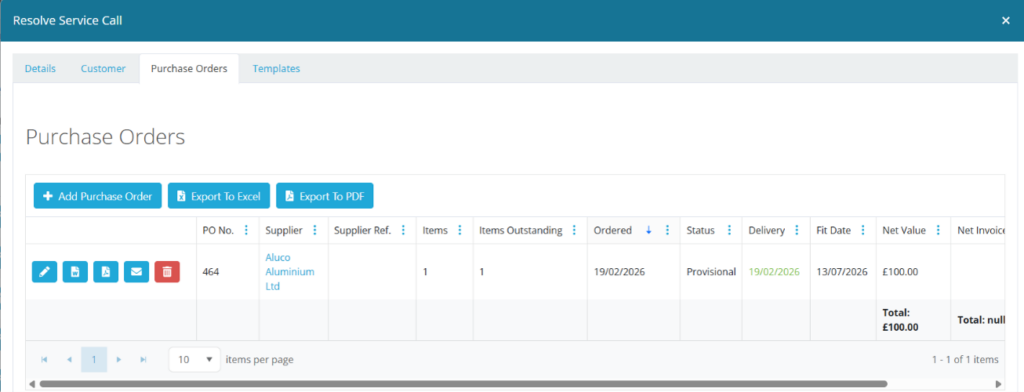
Dedicated Purchase Order Grid: Service calls now feature their own dedicated grid displaying all linked Purchase Orders. This gives you instant visibility over the parts ordered specifically for that call, along with their current status.
Main Grid Visibility: We have updated the main Service Call grid so you can quickly see if parts are required for a job and track their expected delivery dates without needing to open the individual contract file.
Adding Documents to Purchase Order Invoices
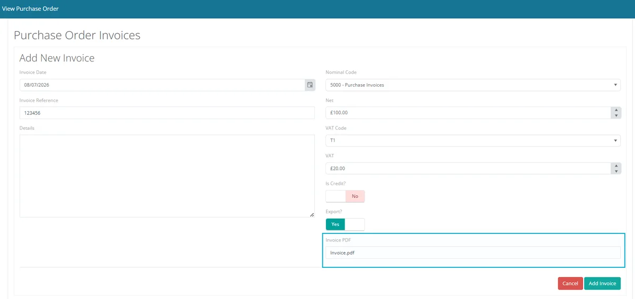
To make financial record keeping easier, the system now allows you to attach a document directly when adding an invoice to a purchase order.
When adding your purchase order invoice, you will see a new option to upload the relevant file.
Once attached, a dedicated link will appear in your list of purchase order invoices, allowing you to download the document instantly. You also have full ability to edit the document details after it has been uploaded.
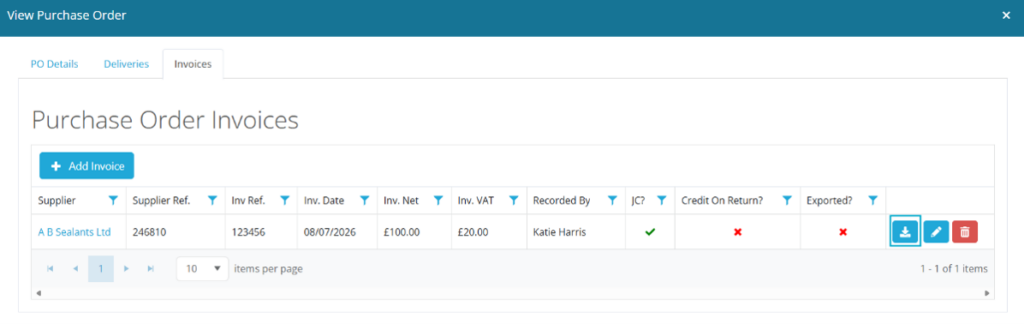
As detailed below , in the API Updates, the function to upload the Purchase Invoice has also been added to our API meaning it can be driven from an external system as well.
Digital Marketing Campaign Tracking via API
To give you greater visibility over your marketing performance, we have updated our API to capture digital marketing source data directly alongside your Enquiries and Leads.
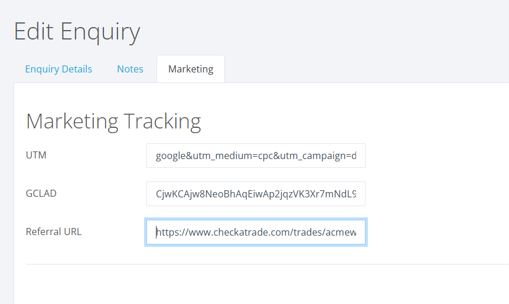
Capture Key Tracking Data: You can now automatically pass UTM parameters, GCLID, and Referral Links straight through to Business Pilot when a new enquiry is generated.
End to End Visibility: By carrying this data through the entire lifecycle of a lead, your marketing and sales teams can trace every prospect back to the exact campaign, channel, or source that originally generated it.
Measure True ROI: This update closes the loop between your marketing spend and your actual sales outcomes. You can now clearly see exactly which digital campaigns are driving real revenue for your business, allowing for far more accurate measurement of your marketing efforts.
API Endpoint Updates
For businesses utilising custom API integrations, we have deployed several updates to support the new purchase order document features:
New endpoint added: /api/PurchaseOrderInvoiceDocuments/create
New endpoint added: /api/PurchaseOrderInvoiceDocuments/download
Updated endpoint: /api/PurchaseOrderInvoices/create has been modified to allow sending a document at the exact same time a purchase order invoice is created.
We hope these new tools bring immediate value to your workflow. Alongside these feature rollouts, we have included several background performance upgrades to ensure maximum reliability, including optimising how images and tabs load within your customer records to significantly improve overall system performance and navigation speeds. As always, our team is ready to help if you need any assistance.